Like Us On Facebook

Showing posts with label Tricks. Show all posts

Monday, 27 June 2016

Root Your Android Mobile To Access More Features [ Root Android ]

Posted by Unknown
'Android Mobile' is the one of the best ''Operating System''.It access features more faster and exactly.But,there is a problem regarding the ''Root Android''.Root Android is one of the major mistake done by 'Android Developers' was to access more and much more features on Android Device you need to 'Root Android Device'.So,'Root Your Android Device To Access More And More Features.So,Let's start to root android device now.


Root Android Device With Out A Computer For Free

Steps To Root Android Device To Access More Features :

Step 1 :

Hold your android mobile which you want to root android device for free.
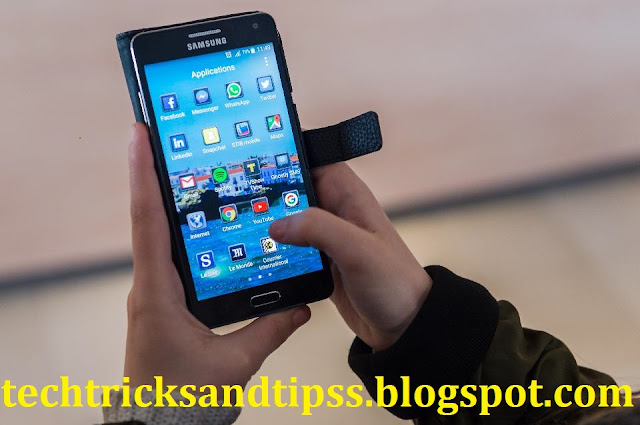

Hold Android Device To Root Android


Step 2 :

Now,'Download' the latest version of ''KingRoot'' app on your Android Device From 'Internet' which is not greater than 12.50 Mega Bytes.

Click Here To Download King Root For Free

Step 3 :

After download the latest version of King Root.Just Install on your android device for free.

Step 4 :

Before you are opening the ''King Root'' to root android device you need to 'Enable Usb Debugging Option' on your Android Device.

Usb Debugging Enable

Step 5 :

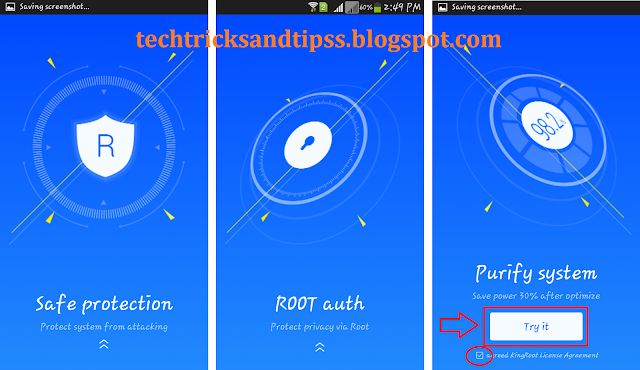
Now,Open the ''King Root App'' on your Android Smart Device which is already installed.Just,Open the App.And scroll up and tap on the ''Try It'' option by accepting the ''King Root License agreement''.

King Root Android

Now,your android smart mobile is starting the process to ''Root Android Device''.

Rooting Android Device

So,this is the way to ''Root Android Device'' for free and best way with any usage of computer.

REMEMBRANCE :

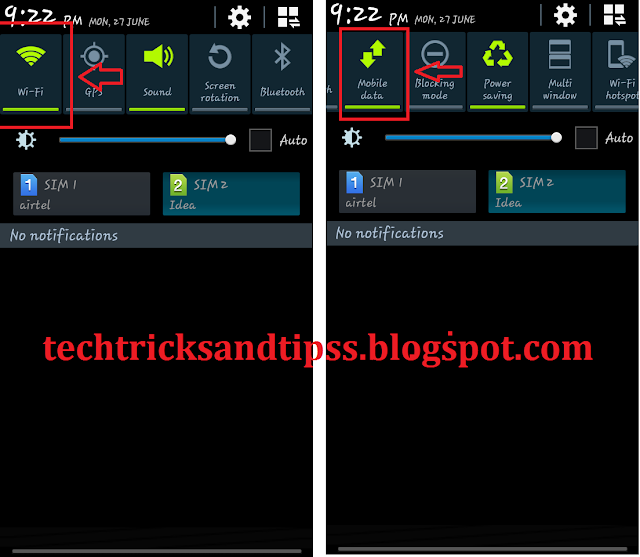
Make sure your ''Android Device'' which you want to ''Root Android'' must and should be connected with either Wi-Fi nor to the Mobile Data.

Open With Wifi Or Mobile Data


Also Read :

Read More

Wednesday, 22 June 2016

Do You Know E-Mail Was Inverted By A 14 Years Old Indian Boy At 32 Years Ago By VA Shiva Ayyadurai

Posted by Unknown
An Indian 14 years young star 'VA Shiva Ayyadurai' was the inventor of ''E-Mail'' [ Electronic Mail ].He invented 'E-Mail' on 1978 at the age of 14 years old only.VA Shiva Ayyadurai was born on December 2, 1963 at Mumbai.VA Shiva Ayyadurai was born in a Tamil Family at Mumbai.When he was at the age of 7 years 'VA Shiva Ayyadurai' left his family for a while and decided to live in United States.


VA Shiva Ayyadurai


Family Of ''VA Shiva Ayyadurai''

'VA Shiva Ayyadurai' mother was 'Meenakshi Ayyadurai','Vellayappa Ayyadurai' was his father and his sister was 'Uma'.

shiva ayyadurai family

Electronic Mail System Was Designed By Livingston Student :

The University of Medicine and Dentistry of New Jersey VA Shiva Ayyadurai was started his work to invent 'E-Mail'.He started his invension as to incoming [ Receive ] and outgoing [ send ] Mail.

incoming [ Receive ] and outgoing [ send ] Mail

VA Shiva Ayyadurai Recognized As The Inventor Of E-mail By US Govt Officially :

Then,VA Shiva Ayyadurai Invented an electronic E-Mail Version of this system.Then,Later he created a new version of computer programme over 51,000 of lines code only.At August 30, in 1982 VA Shiva Ayyadurai Recognized As The Inventor Of E-mail By US Govt Officially by awarding him to a first United States copyright for ''E-Mail'' for his E-Mail Invension on 1978.

VA Shiva Ayyadurai Recognized As The Inventor Of E-mail By US Govt Officially

For the invension of ''E-Mail'' by VA Shiva Ayyadurai he become more popular.He invented this E-mail to communicate each other by sending and receiving messages.But,Finally I specially thanks to ''VA Shiva Ayyadurai'' by inventing ''E-Mail''.Thanks a lot.
Read More

Monday, 20 June 2016

Controll 3 And More Features On Smart Phone Just With A Click Button

Posted by Unknown
Do you know we can controll any 3 or more features on smart phone by few clicking on clickable button.Yes,we can controll any ''Android Device'' with just a few clicks on the button and easy to use your 'Smart Phone'.Just,follow my few steps to controll 'Smart Phone Features' with the help of Click Button for free and easy to click the button and access features on your ''Smart Phone''So,here is a blog that reviews you to controll any 3 or more features with just a clicking a click button.


Controll Smart Mobile With Clickable Button :


Material Required :

  • 3.5 mm of Mini Jack [ Ear Phone's Jack ]
  • A Click Button

  • That Solves.

''Make A Click Button To Controll Smart Phone''

Clickable Button is one of the best ''Gadget'' that enables you to access 3 or More Features in ''Smart Mobiles''.So,don't waste our time let's start now and make fun of making a clickable button for free and best way to use it as well.Click the link below to view more........
>>>>> Click Here To Make A Clickable Button Now <<<<<

Smart Phone Application :

To controll the smart phone by using a click button you need to install a ''Application'' known as 'KLICK' from 'Play Store' just 'Download' the application and install on your Android Mobile for free to click and controll the smart phone.


After Installing the Android App just run the app to controll 3 and more features on smart phone just with a click button.While running application on your smart phone.Now,just insert your ''Click Jack Button'' into the head/ear phone's socket.


After Inserting the Button to the smart phone.It seems likes this as shown in the images below now select the ''Skip'' option and Add any feature which is present on this App.To add features just tap on the ' + ' symbol and there will be appears related features and add according to you clicks to open the application by clicking the ''Click Button'' 1 or 2 or 3 times.For Example :

  • On 1st Click option I have set the ''Camera'' feature to open.When I have click the Click Button for 'Once' then the camera will automically opens.
  • On 2nd Click Option I have set the ''Flash Light'' feature to open.When I have click the Click Button for 'Twice' then the flash light will automically opens.
  • On 3rd Click Option I have set the ''Phone'' feature to open.When I have click the Click Button for 'Thrice' then the phone will automically opens.
So,Finally you have made a ''Click Button'' and it uses too...!!!!


                    Samsung Galaxy Mega 5.8 GT-I9152 Mobile Review.
Read More

Make A Clickable Button To Controll 3 Or More Features In Smart Mobile

Posted by Unknown
Clickable Button is one of the best ''Gadget'' that enables you to access 3 or More Features in ''Smart Mobiles''.So,don't waste our time let's start now and make fun of making a clickable button for free and best way to use it as well.


Procedure :

Take a Click Button and a ''3.5 mm of mini jack'' [ headset jack ].Remove the waste material from 3.5 mm mini jack like plastic and some other wastages as well along with the wires as well to controll many features on your android device with this click button.


Now,you need to take the waste material removed from 3.5 mini jack and cut the ''Green And Blue Colour'' Marked area as shown in the image below by using a mini cutter.


Now,take a ''Click Button'' and fix the one of the click button's Outer to the ''Red Coloured'' Marked Area and other to fix to the ''Red Dotted Area or Yellow coloured area'' fix it by using a soldering rod as shown in the figure below.


After that plaste them together by using a plastic plaster just cover it.


Now,finally making of clickable button is ready to controll 3 or more features in ''Smart Mobile'' by just clicking the clickable button.
Read More

Monday, 13 June 2016

Recover Deleted Facebook Messenger Messages/Conversation On Android For Free

Posted by Unknown
Did you know we can Recover Deleted Facebook Messenger Messages/Conversation On Android For Free.Around world wide are using facebook to share their feeling and much more with their friends on facebook.Some times many people's messages are deleting on facebook but they did'nt know how to recover the facebook messenger messages/conversations.So,here is the blog that reviews you to recover the deleted facebook messenger messages/conversation on android for free and best way to recover messages.


''Recover Facebook Messages'' :


How To Use ''Gt Recovery - Undeleted,Restore'' On Android Device :

Open ''Gt Recovery - Undeleted,Restore App On your Android Device and then,tap on ''Recover Messanger'' option on your android device to recover deleted facebook messenger messages/conversations.

After that tap on 'Scan Deleted Chat''And wait a second to recover facebook messages.Then,the App you installed is scanning for deleted chats and messages and helps you to recover facebook messenger messages/conversation.

After the scanning is completed the Android App you Installed will shows the deleted messages and conversation.Now,you can see the deleted messages and conversation which is now recoved.just,open your messages and share your feelings...!!!!!

Files Under :


Read More

Saturday, 11 June 2016

Confirm All Facebook Friends Requests At Once

Posted by Unknown
Many people are struggling to confirm many friends requests on facebook.But,there was a solution to solve this problem.Here,is a one of the best blog that reviews you to confirm all friends requests at once with out struggling.


Confirm All Friends Requests :

First of all we need to open your favourite ''Web Browser''.So,better choose ''Google Chrome'' for faster 'Internet'.And go to ''More Tools Option''.And there will appears a sub menus and choose ''Extensions'' option.


Then,A New window will automically opens.Then,scroll down the page and select the ''Get More Extensions''.Then,an other new window will again automically opens.


Now,go to the ''Google Chrome Search Box'' and type ''Facebook Tool Kit'' and search for it.When Facebook Toolkit is find just click the ''+Add To Chrome''option.


Then,''Facebook ToolKit'' 'CRX' is automatically downloaded.Then,just go back to your extensions page and just ''Drag And Drop'' the ''Facebook ToolKit Extension to the extensions page and it will Appears as shown in the Image below to confirm all friends requests at once on facebook.


Instructions To Use ''Facebook ToolKit'' :

Now,go to your facebook account and click on ''Friends Requests'' and again click on ''View All'' option.


Now,the Magic Starts.Now Click on the ''Facebook ToolKit Icon''and select the ''Accept/Reject All Friend Requests''Option And Then,click on ''Accept All Friends'' option to confirm all facebook friends requests at once.


Now,Automically the friends requests are conformed on facebook with just single click.Now,you can use this tool any time to confirm all friends requests at once on facebook.I hope you got an idea.
Read More

Friday, 10 June 2016

Check Your Profile Visitors On Facebook

Posted by Unknown
'Facebook' is the one and only best ''Social Networking Service'' launched by ''Mark Zuckerberg'' on February 4, 2004.Many facebook users are what to know who are viewing/visiting their personal facebook profile etc..etc...Here,are some tricks about to check your profile visitors on facebook.


Checking Profile Visitors On Facebook :

First of all you need to 'Login' to your ''Facebook Account''.


After that open your ''Facebook Timeline''.And 'Right Click' any empty space then,select ''View Page Source option by Left Clicking it.Then,a new window will open automically when your using this trick on 'Google Chrome Web Browser' to check your profile visitors on facebook.


After a new windows opens on your browser it appears as shown in the Image below.


Then,press ''Controll + F'' on your keyboard.Then,a small search box appears as shown in the Image below to check your profile visitors on facebook.


Now,type ''InitialChatFriendsList'' in the box appears without any space just type it.That search box helps you to find out the keywords you type to check your profile visitors on facebook.


Now,you can see the various of numbers and characters.Now,you need to select only the number I mean your friends facebook Id's.Only copy the Id's of your facebook friends to check your profile visitors on facebook.


After copying your friend facebook id's.Now,go to your facebook Account and ''Paste'' your friends facebook id after the web address of -->> https://www.Facebook.com/ on 'URL' section to check your facebook profile visitors.


After pasting your friend facebook id just ''Hit Enter''.Now,you can see somebody facebook profile.Now, you viewed profile person is viewed your profile past.


Now,you can check your profile visitors on facebook account.Enjoy it.
Read More

Sunday, 5 June 2016

How To Trace A Lost/Stolen Android Mobile For Free

Posted by Unknown
Here,is a blog that shows/reviews you to find your personal Android Mobile when it has been stolen/missed.Many people are using their personal mobile carelessly and got stolen/lost/missed.Almost there are many Android users lost their mobiles and become sad and dull.Now,this is the blog that reviews you how to trace a stolen/lost Android Mobile for free and best way to trace your Android Mobile.


Trace Your Lost/Stolen Android Mobile

So,Let's start tracking the lost/stolen Android Mobile.First of all you need to create a ''Google Play Store'' Account I mean ''G-Mail''.''G-Mail'' is the plays the major role in the Internet.So,better you create a ''G-Mail'' Account for Free.After that Login to your ''Google Play Store'' Account with your free G-Mail Account on your personal Android Mobile.Now,go to the ''Play Store App'' on your personal Android Device.And type in the search box as ''Android Device Manager''.


Download And Install


Now,go to ''Setting'' on your Android Device to trace stolen/lost android mobile.And go to ''More Settings'' option.


After,that ''Turn On the location'' or ''GPS''- Global Positioning System.


Now,again go back to the ''Settings''and tap on ''Security Option''.


Now,click/tap on ''Device Administrators'' option.


Now,Select the ''Android Device Manager'' and activate it to trace a lost/stolen android mobile.


Now,open the ''Android Device Manager''App on your personal mobile.And Sign In with your ''G-Mail'' account.


Now,you can trace the stolen/lost android mobile.


The ''blue dot'' or may some time shows the navigative arrow mark as shows the current location of a android mobile.Finally,the lost/stolen android mobile has been traced for free.

REMEMBER :

When you are tracing a lost/stolen android mobile.The Android Mobile should to connected to Wi-fi or Mobile Data,must be already install ''Android Device Manager'' App on the android device,must and should be ''Location or GPS'' are of turned on.Then,only this trick works properly to trace stolen/lost android mobile.


Read More